
# 基础页面设计器
基础页面设计器是低代码开发引擎的核心组件之一,它提供了一套完整的页面设计工具,支持拖拽、编辑、预览等功能,用户可以通过设计器快速构建页面。
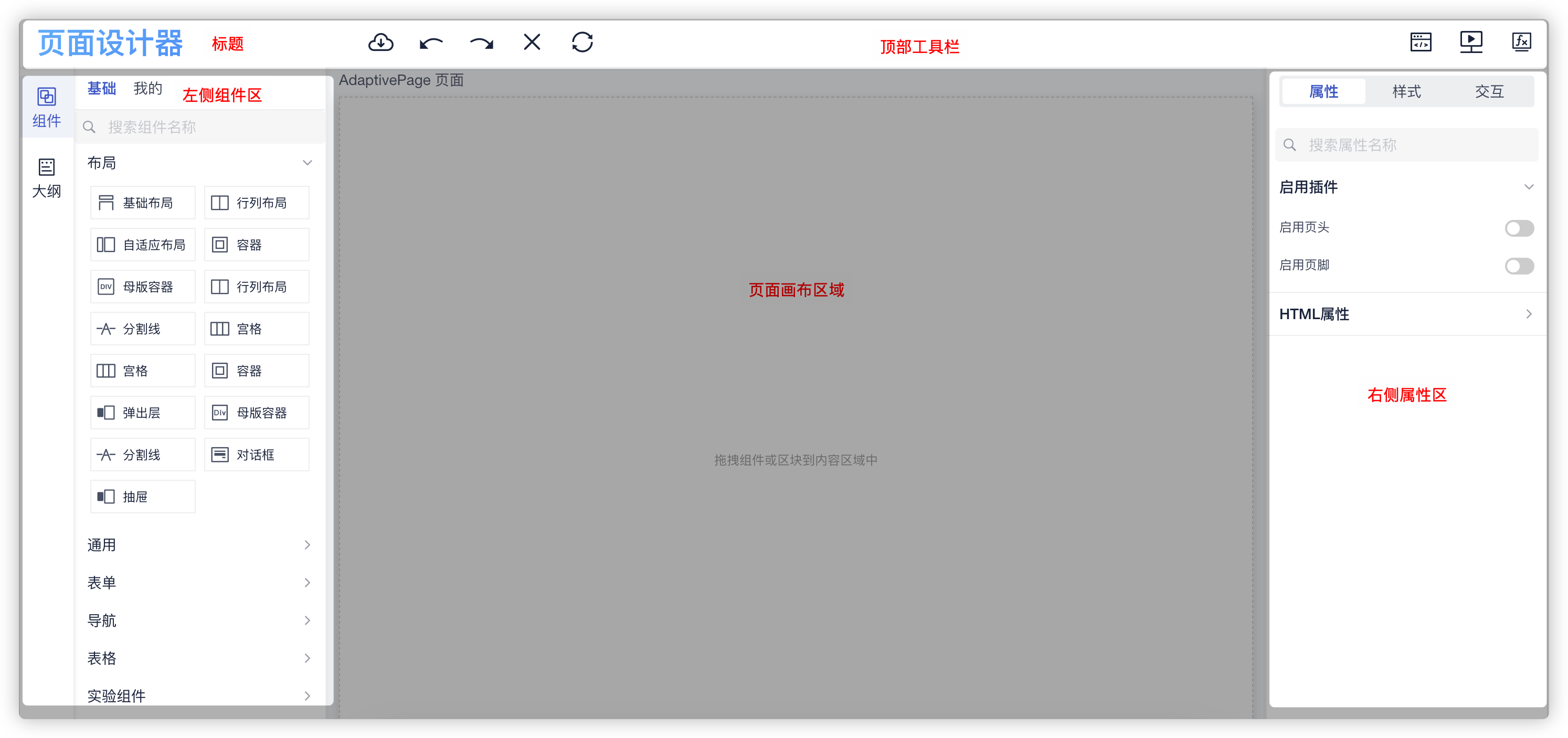
# 引入依赖
基础页面设计器的依赖主要来自依赖包 @fly-vue/lcdp-designer,此外相关的配置、参数、组件等还需要从其他依赖包中导入。
npm install @fly-vue/lcdp-designer @fly-vue/lcdp-iview @fly-vue/lcdp-designer-extra @fly-vue/lcdp-engine
# 使用示例
创建一个 vue 文件,引入设计器组件,然后传递相应的参数即可。
<template>
  <div class="playground">
    <lcdp-designer
      :theme="theme"
      :schemas="schemas"
      :json="payload"
      :config="config"
      @on-change="onDesignChange"
      @on-ready="onReady"
    />
  </div>
</template>
<script setup lang="ts">
  import { StyleEditor } from '@fly-vue/lcdp-iview';
  import { SchemaRegistry } from '@fly-vue/lcdp-engine';
  import { ActionsEditor } from '@fly-vue/lcdp-designer-extra';
  import lodash from 'lodash';

  // 页面设计器主题
  const theme = {
    title: '页面设计器',
    device: {
      type: 'pc'
    },
    showContent: true,
    // 顶部工具栏
    topBar: {
      show: true,
      content: [
        { title: '保存', custom: 'idesignfont ides-cloud-save', command: 'save' },
        { title: '撤销', custom: 'idesignfont ides-repeal', command: 'undo' },
        { title: '恢复', custom: 'idesignfont ides-recover', command: 'redo' },
        { title: '删除', custom: 'idesignfont ides-delete', command: 'del' },
        { title: '刷新', custom: 'idesignfont ides-refresh', command: 'refresh' },
        { title: '代码', custom: 'idesignfont ides-code', isright: true, command: 'code' },
        { title: '预览', custom: 'idesignfont ides-preview', isright: true, command: 'preview' },
        { title: '变量', custom: 'idesignfont ides-fx', isright: true, command: 'pagevariate' }
      ]
    },
    // 左侧工具栏
    leftBar: {
      show: true,
      content: [
        {
          title: '组件',
          icon: 'idesignfont ides-plugin',
          components: ['controls']
        },
        {
          id: 'outline',
          title: '大纲',
          component: 'outline',
          icon: 'idesignfont ides-catalog'
        }
      ]
    },
    // 右侧工具栏
    rightBar: {
      show: true,
      content: [
        {
          title: '属性',
          icon: 'idesignfont ides-attr',
          items: [
            {
              components: ['attrs'],
              title: '属性',
              watch: ['node', 'rootNode'],
              props: {
                folds: ['更多配置', '更多']
              }
            },
            {
              title: '样式',
              component: StyleEditor,
              watch: ['node', 'rootNode'],
              props: {
                style: 'padding:0 8px 8px;'
              }
            },
            {
              title: '交互',
              component: ActionsEditor,
              icon: 'idesignfont ides-inturn',
              watch: ['node'],
              props: {
                style: 'padding: 8px;'
              }
            }
          ]
        }
      ]
    }
  };

  // 组件定义(这里获取全部)
  const schemas = SchemaRegistry.getAllSchemas();
  console.log(schemas.definitions);

  // 设计器扩展服务配置
  const config = {};

  // 页面设计器初始数据
  const payload = {
    source: null,
    annotations: null,
    description: null,
    summary: null,
    meta: {
      title: '首页',
      platform: 'mobile'
    },
    type: 'AdaptivePage',
    version: '2.0',
    props: {},
    dataSources: [],
    id: 'index',
    body: []
  };

  // 设计器内容发生变更后事件
  const onDesignChange = (event) => {
    console.log('change', event);
  };

  // 设计器装载完成后
  const onReady = () => {
    console.log('ready');
  };
</script>
# 指定 schemas
这里的 schema 提供了设计器可用的组件、交互等部件的描述JSON。
因为在上面依赖引入的时候我们引入了 @fly-vue/lcdp-iview,所以默认情况下我们使用以下代码获取到的 schemas 就是 iview 的 schema,也就是我们可以在设计器中使用这个包提供的 iview 组件用于页面设计。
import { SchemaRegistry } from '@fly-vue/lcdp-engine'
// 获取全部组件描述
const schemas = SchemaRegistry.getAllSchemas()
# 其他配置
这里的 config 参数与渲染引擎的 config 参数一致,用于指定页面渲染过程中其他元素的获取,如页面、字典、数据源等。
import { LcdpRenderer } from '@fly-vue/lcdp-engine'

const config: LcdpRendererConfig = {}