
# API 文档
遵循OpenAPI规范定义API,可以用文档生成工具来展示您的 API,或用代码生成工具来自动生成各种编程语言的服务器端和客户端的代码、用自动测试工具进行测试等等。
# Swagger 配置
REST模块对springdoc-openapi做了拓展和定制处理,建议引用Fly整合依赖:
pom.xml:
<dependency>
    <groupId>cn.openfuse</groupId>
    <artifactId>fly-rest</artifactId>
    <version>${fly.version}</version>
</dependency>

<dependency>
    <groupId>cn.openfuse</groupId>
    <artifactId>fly-starter-rest-springdoc</artifactId>
    <version>${fly.version}</version>
</dependency>
内部主要依赖为springdoc-openapi-webmvc-core,已由fly-starter-rest-springdoc传递引入,使用时可以只管理Fly版本,由框架维护更新springdoc版本。
依赖引入后启动工程,参考日志:
INFO o.s.s.web.DefaultSecurityFilterChain     : Will secure Ant [pattern='/v3/api-docs'] with []
INFO o.s.s.web.DefaultSecurityFilterChain     : Will secure Ant [pattern='/v3/api-docs.*'] with []
INFO o.s.s.web.DefaultSecurityFilterChain     : Will secure Ant [pattern='/v3/api-docs/*'] with []
根据日志,Json格式文档可通过以下格式url访问:
http://{server}:{port}/{context-path}/v3/api-docs
若本地工程端口为8080,无上下文,则访问http://localhost:8080/v3/api-docs (opens new window)查看OpenAPI Json:
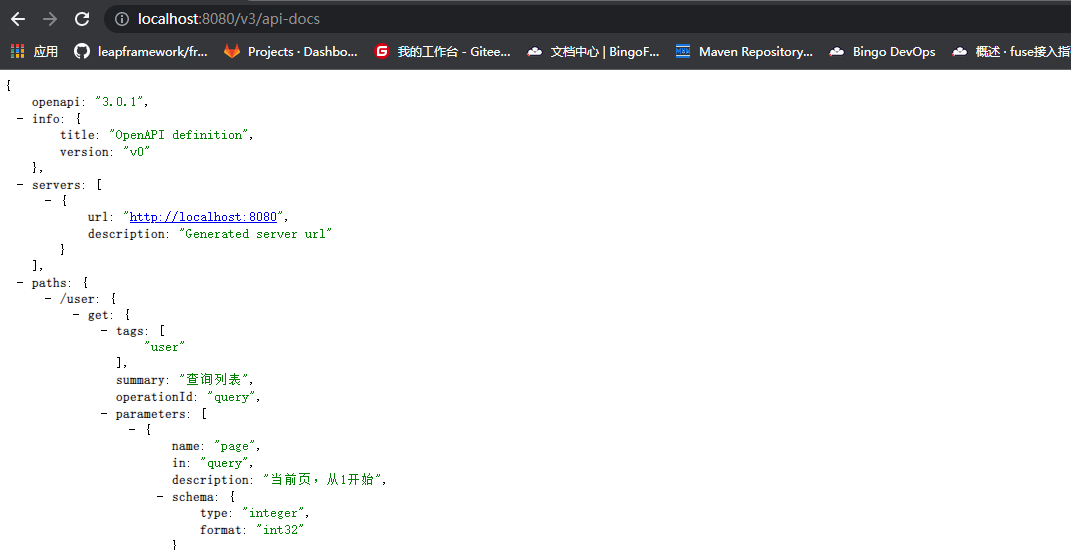
/v3/api-docs为默认路径,可在application.yml中配置修改:
springdoc.api-docs.path=/api-docs
引入fly-rest依赖后,默认开启文档中Operations、Parameters和Schema的拓展(x-)字段和值的显示(springdoc.swagger-ui.showExtensions=true)。
更多官方配置可查看文档 https://springdoc.org/#properties 使用,或进入org.springdoc.core.SpringDocConfigProperties类了解。
# 定制处理
在API开发中框架提供快速实现的CRUD增删改查接口,已自带了操作概要及参数描述等,在这里我们可以了解到对于自定义接口,如何详细定义文档内容。
Fly拓展文档注解包路径基本为fly.core.meta.annotation
# Paths
在Paths中,每一个键为Path路径,而一个路径可以对应多个API操作。常见的有如/user/{id}下可以有patch、get、delete等操作:
# Path 路径
- 增加
fly.rest.doc.springdoc.PathCustomizer接口,定制处理API文档中所有路径,如果有返回值,且返回不为原值,则进行替换,需注册为bean。
# Operation 操作
- 定义描述
description:API方法上配置@Desc注解; - 定义概要
summary:API方法上配置@Summary注解。
@Desc("@Desc")
@Summary("@Summary")
@GetMapping("/user")
public List<Record> query(Query query) {...}
{
    "paths": {
        "/user": {
            "get": {
                "description": "@Desc",
                "summary": "@Summary"
            }
        }
    }
}
# Parameter 参数
- 增加
fly.rest.doc.springdoc.ParameterCustomizer接口,定制处理文档中生成的API参数,需注册为bean。具体方法及使用场景可进源代码查看注解; - 自动处理
Pageable、Queryable、Filters、OrderBy、Findable等分页及Fly提供的查询参数,根据不同的参数类型,补充添加对应的详细参数及默认描述到接口文档; - 上下文参数,该类型参数用于逻辑使用,不在文档中显示,或替换为其他参数显示。设下列示例中
API的SampleContext参数为上下文参数:
@RestController
@RequestMapping("/sample")
public class SampleController {

    @GetMapping("/context_id")
    public String getContextId(SampleContext context) {
        return "";
    }

}
上下文参数的定义方式一为添加fly.core.web.annotation.ContextParam注解:
import fly.core.web.annotation.ContextParam;
import io.swagger.v3.oas.annotations.Parameter;
import java.lang.annotation.Retention;
import java.lang.annotation.RetentionPolicy;

@ContextParam
@SampleContext.ParameterDocs
public class SampleContext {

    @Parameter(name = "contextId")
    @Retention(RetentionPolicy.RUNTIME)
    @interface ParameterDocs {

    }

}
方式二:通过WebCustomizer注册:
import fly.core.web.WebCustomizer;
import fly.core.web.parameter.ParameterSupport;

...

@Bean
WebCustomizer flyWebCustomizer() {
    return new WebCustomizer() {
        @Override
        public void customize(ParameterSupport parameterSupport) {
            parameterSupport.registerContextParameterType(SampleContext.class);
        }
    };
}
最终生成的API文档中,该API的参数不为SampleContext,而是SampleContext上下文参数中设置的contextId。
- 定义参数描述:使用
@Desc、@Summary、@Title其中之一注解,优先级从左到右;
# Response 响应
- 增加
fly.rest.doc.springdoc.ResponseCustomizer接口,定制处理文档中生成的API响应内容,需注册为bean。具体方法及使用场景可进源代码查看注解; - 对于方法返回类型为
void的API,且状态码为200的Response,改为返回204(No Content); Java返回类型为org.springframework.data.domain.Page或fly.orm.dao.query.QueryResult,且返回状态成功的Response,添加请求头X-Total-Count,表示分页查询数据总数;Extension拓展:
- 方法若配置了
org.springframework.lang.Nullable注解,对于状态码以20开头的Response,增加返回x-nullable;
# Tag 标签
Controller下的API,若只存在一个且以-controller结尾的tag,默认移除该后缀。示例:user-controller将转换为user;
# Components
# Schemas 模式对象
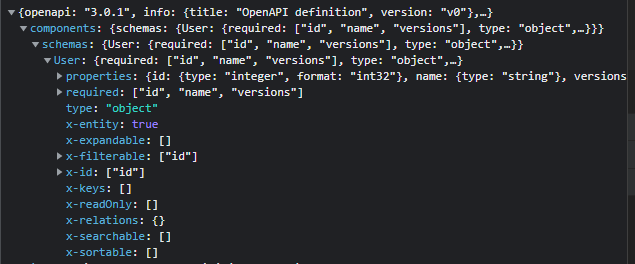
Schemas又名为Data Models,使用模式对象描述数据类型。来源于数据访问中定义的实体模型等。
对于单个 Schema:
- 定义标题
title:实体配置@Title注解 - 定义描述
description:实体配置@Desc或@Summary注解
# Property 属性
- 定义描述
description:属性配置@Desc、@Summary、@Title其中一注解,优先级从左到右 Extension拓展:
- 对于实体模型:
| 拓展名称 | 描述 |
|---|---|
x-entity | 是否为实体模型 |
x-id | 主键数组 |
x-keys | 唯一键数组 |
x-readOnly | 只读内容,如配置了不可写@Writable(false)的字段 |
x-relations | 实体存在的关系及其关联字段映射 |
x-searchable | 快捷搜索字段,如配置了@Searchable的字段 |
x-sortable | 可用于排序的字段,如配置了@Sortable的字段 |
x-filterable | 可用于过滤的字段,如配置了@Filterable的字段 |
x-expandable | 可展开的内容,如关系名称等 |
# Security Schemes
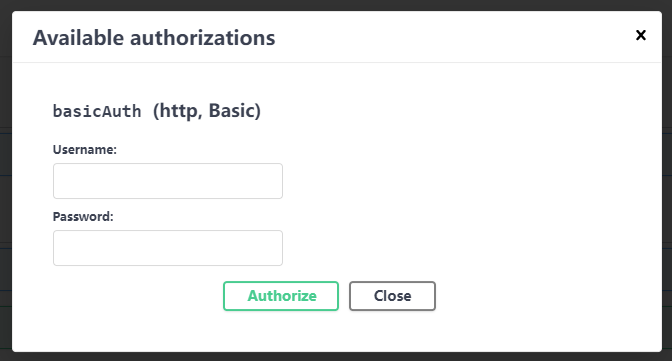
- 配置了
Fly提供的基础认证后,会生成对应的securityScheme:
components:
  securitySchemes:
    basicAuth:
      type: HTTP
      schema: basic
# Swagger UI
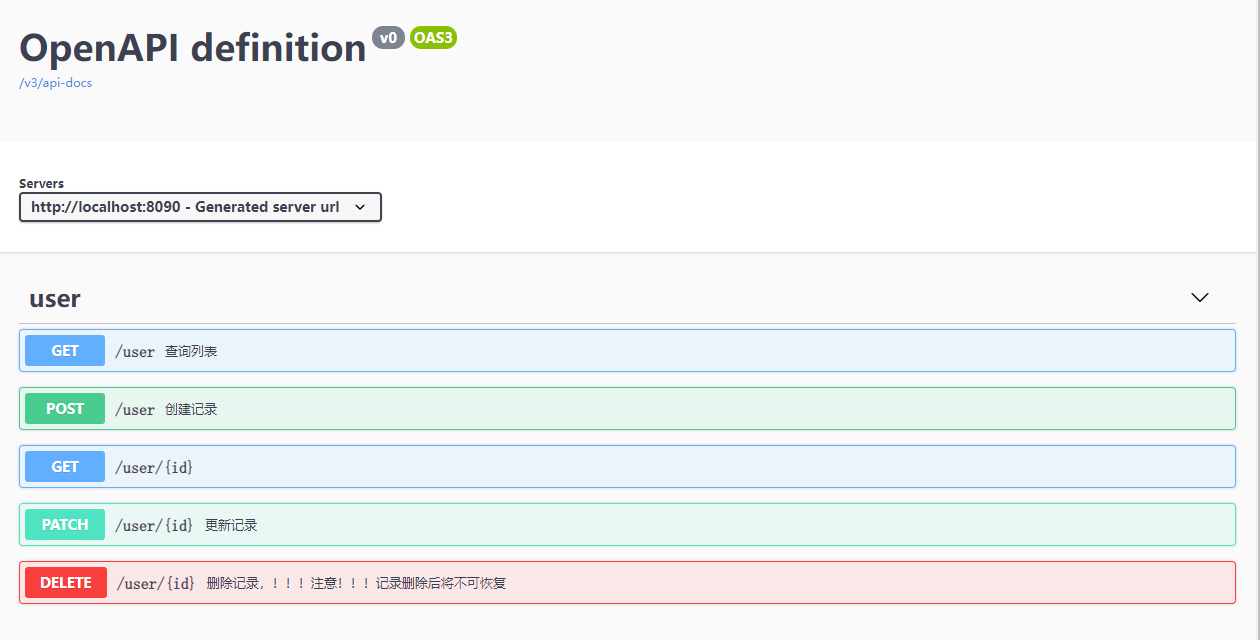
根据Json格式的API文档,在工程中添加springdoc-openapi-ui依赖,能够可视化API资源并与之交互,易于后端开发和客户端使用,效果如下图:
pom.xml引入依赖:
<dependency>
    <groupId>org.springdoc</groupId>
    <artifactId>springdoc-openapi-ui</artifactId>
    <version>${springdoc.version}</version>
</dependency>
或引入fly-starter-rest-swaggerui,由框架管理springdoc版本:
<dependency>
    <groupId>cn.openfuse</groupId>
    <artifactId>fly-starter-rest-swaggerui</artifactId>
    <version>${fly.version}</version>
</dependency>
springdoc-openapi-ui会传递引入springdoc-openapi-webmvc-core依赖
此时启动工程,参考日志:
INFO o.s.s.web.DefaultSecurityFilterChain     : Will secure Ant [pattern='/swagger-ui.html'] with []
INFO o.s.s.web.DefaultSecurityFilterChain     : Will secure Ant [pattern='/swagger-ui/**'] with []
访问http://localhost:8080/swagger-ui.html (opens new window),可得此小节开头的效果图。
更多关于Swagger ui的官方配置,可查看https://springdoc.org/#swagger-ui-properties (opens new window),或进入org.springdoc.core.SwaggerUiConfigProperties配置类了解。