
# 扩展函数节点
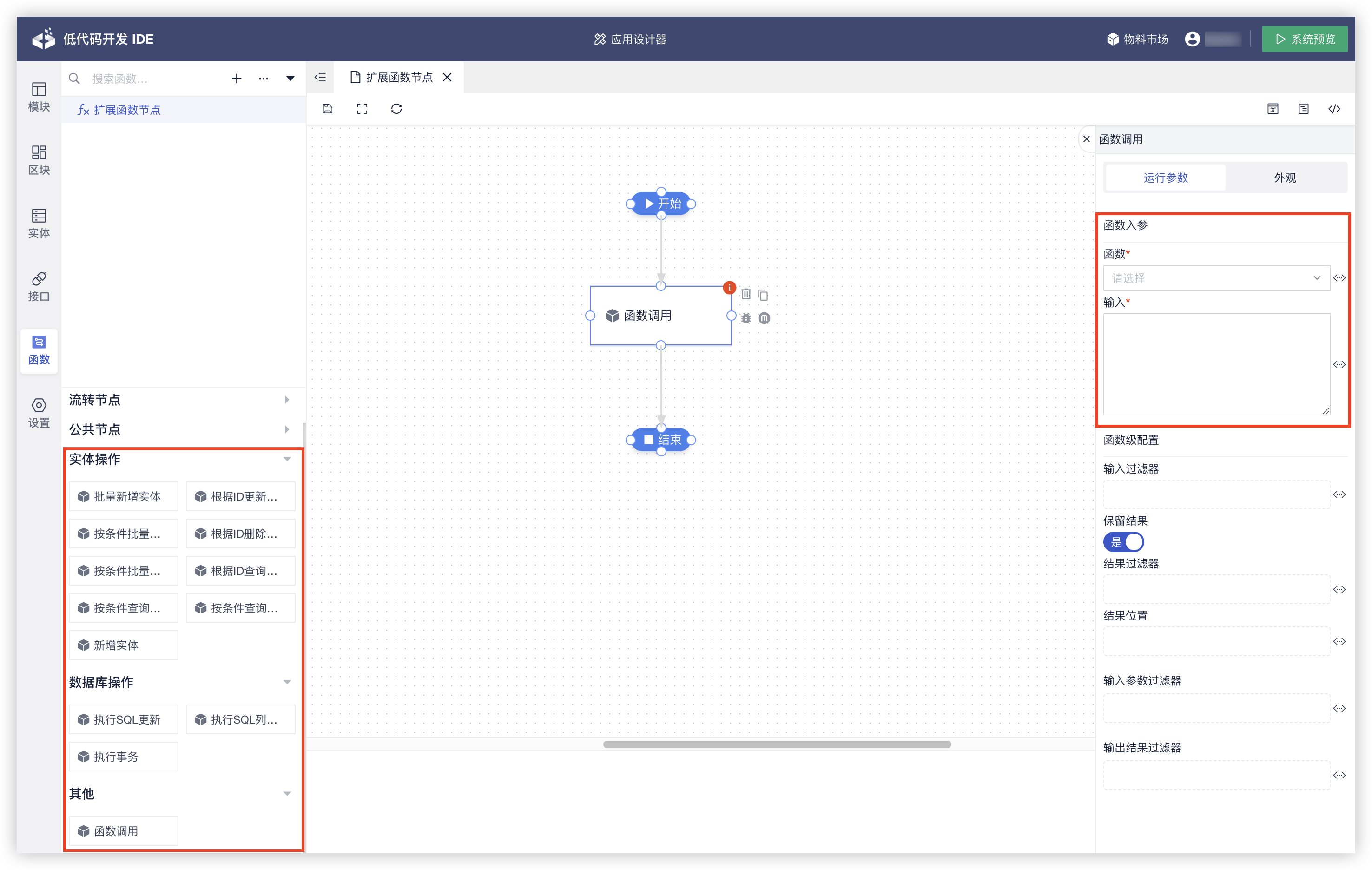
开启【函数】组件后,自定义函数将分组显示在函数详情页左侧,分组下为函数的多个操作。上图中为内置提供的函数,若想在已有分组中增加函数操作,自定义时所属分组group一致即可。具体定义数据结果可见/schema请求,示例:
{
    "label": "函数调用",                            // 函数标题
    "name": "GeneralOperationsImpl#linkFunction",  // 函数名,唯一
    "operation": "custom:linkFunction",            // 函数表达式
    "type": "custom",                              // 函数类型,custom自定义
    "orderNo": 0,                                  // 分组内排序
    "parameters": {  // 参数组
        "function": {
            "label": "函数",            // 参数标题
            "name": "function",        // 参数名,唯一,作为参数组的key
            "type": "string",          // 参数数据类型
            "defaultValue": null,      // 参数默认值
            "description": "",         // 参数描述
            "required": true,          // 参数是否必填
            "inputType": "SelectOrch"  // 参数输入控件类型,一般可不填,自动根据参数数据类型判断
        }
    },
    "output": {              // 输出结果
        "label": "调用结果",  // 输出结果标题
        "name": "result",    // 输出结果名
        "type": "object",    // 输出结果数据类型
        "description": ""    // 输出结果描述
    },
    "group": ""  // 所属分组,为空时归属到默认分组[其他]
}
# 配置式实现
配置方式实现,主要通过定义中的operation属性配置SpEL(Spring表达式语言),通过执行表达式的方式,可自定义大部分场景的函数操作。
在api工程/resources/schema.yml文件中添加函数操作定义,会同时在/schema接口中返回给IDE使用。下列提供了执行静态方法、调用bean方法等常见示例。
# 调用静态方法
- label: 获取两数中最大值
  name: Math.min
  type: custom
  operation: T(java.lang.Math).max(intVal1, intVal2)
  orderNo: 1
  parameters:
    - label: 数值1
      name: intVal1
      type: integer
      defaultValue: 0
      description: 参数描述
      requred: true
    - label: 数值2
      name: intVal2
      type: integer
      defaultValue: 0
      description: 参数描述
      requred: true
  output:
    label: 最大值
    name: maximum
    type: integer
    className: java.lang.Integer
    description: 输出结果描述
# 调用bean方法
- label: 调用名为bean1的bean
  name: Bean.bean1.method1
  type: custom
  operation: "@bean1.method1(str1)"
  orderNo: 1
  parameters:
    - label: 字符串1
      name: str1
      type: string
      defaultValue: "123"
      description: 参数描述
      requred: true
  output:
    label: 最大值
    name: maximum
    type: integer
    className: java.lang.Integer
    description: 输出结果描述
operation表达式中可调用的bean需要注册并添加@ExpressionModule注解指定name:
import openfuse.serverlessworkflow.api.expression.ExpressionModule;

@Bean
@ExpressionModule("bean1")
Bean1 bean1() {
    return new Bean1();
}
更多表达式使用可见fly-framework (opens new window)以及Spring SpEL官方文档。
# 进阶实现
在特殊场景下,若想要为函数操作设计更复杂的逻辑,可用Java进阶实现。本小节将介绍如何利用函数定义注解等实现函数操作,在大部分场景下,我们只需要关注函数操作类的处理逻辑即可。
# 实现函数操作类
- 函数操作类
import openfuse.serverlessworkflow.web.schema.anno.FunctionModule;
import openfuse.serverlessworkflow.web.schema.anno.FunctionOutput;
import openfuse.serverlessworkflow.web.schema.anno.FunctionParameter;

/**
 * 函数操作类,每个方法作为一个函数操作。
 */
public class CustomOperations {

    // 注意'c'不能重复,如现已有custom:linkFunction,则这里为custom时可能影响原有函数表达式。
    public static final String PROVIDER_NAME = "c";

    protected static final String OPERATION1 = PROVIDER_NAME + ":operation1";

    /**
     * 函数操作,函数定义注解说明见下文。
     */
    @FunctionModule(label = "自定义操作1", operation = OPERATION1)
    @FunctionOutput(name = "result", label = "结果", type = DataType.NUMBER)
    public int operation1(
            @FunctionParameter(label = "字符串参数", required = false, type = DataType.STRING)
            String str1) {
        // todo: 逻辑实现
    }

}
函数定义注解说明:
@FunctionModule - 函数操作定义
| 属性 | 说明 | 默认值 |
|---|---|---|
| name | 函数操作名,唯一 | 类名#方法名 |
| label | 函数操作标题 | - |
| type | 函数操作类型 | CUSTOM |
| operation | 必填,函数操作映射的表达式 | - |
| orderNo | 排序 | 0 |
| description | 描述 | - |
| group | 所属分组 | - |
@FunctionParameter - 函数操作参数定义
| 属性 | 说明 | 默认值 |
|---|---|---|
| label | 参数标题 | - |
| type | 参数数据类型 | OBJECT |
| defaultValue | 默认值 | - |
| description | 描述 | - |
| required | 是否必填 | true |
@FunctionOutput - 函数输出结果定义
| 属性 | 说明 | 默认值 |
|---|---|---|
| name | 输出结果名 | - |
| label | 输出结果标题 | - |
| type | 输出结果类型 | OBJECT |
| description | 描述 | - |
- 函数实现类
实现openfuse.serverlessworkflow.api.function.Function接口:
import openfuse.serverlessworkflow.api.function.Function;

/**
 * 自定义函数,执行调用函数操作类方法。
 */
public class CustomFunction implements Function {

    private final String name;
    private final CustomOperations operations;
    private final Method operation;

    public CustomFunction(String name, CustomOperations operations, Method operation) {
        this.name = name;
        this.operations = operations;
        this.operation = operation;
    }

    @Override
    public String name() {
        return name;
    }

    @Override
    public Object apply(ExecutionContext context, Map<String, Object> arguments) {
        Object result;
        try {
            Object[] args = Arrays.stream(operation.getParameters())
                    .map(param -> arguments.get(param.getName()))
                    .toArray();

            result = operation.invoke(operations, args);
        } catch (IllegalAccessException e) {
            throw new WorkflowException(e.getMessage(), e);
        } catch (InvocationTargetException e) {
            throw new WorkflowBusinessException("INVOCATION_ERROR", e.getMessage(), e);
        }
        return result;
    }

    @Override
    public Object getOperation() {
        return operation;
    }

    @Override
    public Type getReturnType() {
        return operation.getGenericReturnType();
    }

}
- 暴露函数
import openfuse.serverlessworkflow.api.function.FunctionProvider;

/**
 * 用于注册xx中定义的函数方法。
 */
public class CustomFunctionProvider implements FunctionProvider {

    protected CustomOperations operations;
    protected Map<String, Method> functions;

    public CustomFunctionProvider() {
        this.operations = new CustomOperations();
        this.functions = Collections.unmodifiableMap(Arrays.stream(CustomOperations.class.getMethods())
                .filter(method -> method.isAnnotationPresent(FunctionModule.class))
                .collect(Collectors.toMap(Method::getName, java.util.function.Function.identity())););
    }

    @Override
    public Function createFunction(String name, FunctionMetadata metadata) {
        Method operation = functions.get(metadata.getExpression());
        if (operation == null) {
            throw new IllegalArgumentException(CustomOperations.class.getSimpleName() + " function '"
                    + metadata.getExpression() + "' not found.");
        }
		return new CustomFunction(name, operations, operation);
    }

}
在Configuration配置类中注册为bean,并用@Qualifier注解指定限定符(见函数操作类):
@Configuration(proxyBeanMethods = false)
public class CustomConfiguration {

    @Bean
    @Qualifier(CustomOperations.PROVIDER_NAME)
    FunctionProvider customFunctionProvider() {
        return new CustomFunctionProvider();
    }

}
# 注册操作类定义
为将新增的函数操作返回定义给IDE界面使用,上文中函数操作类已使用@FunctionModule、@FunctionOutput、@FunctionParameter等注解对函数操作进行定义,可以在Configuration配置类中添加@FunctionScan注解,对指定package下的类进行扫描并生成定义添加至/schema:
import openfuse.serverlessworkflow.web.schema.anno.FunctionScan;

@Configuration(proxyBeanMethods = false)
// 可指定其他package(默认为当前package),为减少不必要的扫描,建议缩小范围。
@FunctionScan(basePackages = {"xxx.xxx"})
public class CustomConfiguration {
}
# 定义属性覆盖
对于一些定义注解中缺少而IDE需要的属性如inputType等,可以在/resources/schema.yml中进行添加或覆盖,该文件属性优先级高于注解属性:
- name: "CustomOperations#operation1" # 根据name查找对应的函数操作,必填
  parameter:
    param1:
      inputType: xxx